Star_Kit -03 $19.50 (Digital Files Only)
Designed for serious skill‑building, this premium kit lets students and beginners practice professional electronics assembly while creating a striking, functional display piece that represents balance and harmony.

Kit contents
-
PCB Gerber files, and STL enclosure file only, ready to print, no physical components included.


Kit Highlights
-
Gerber files ready to print — large PCB layout (193mm × 180mm).
-
Clean professional design — no exposed traces on the PCB topside.
-
Mixed technology soldering practice — through‑hole LEDs plus surface‑mount resistors, diode, and fuse.
-
Balanced LED display — 30 × 5mm LEDs arranged in a star pattern for striking visual effect.
-
Surface‑mount challenge — 17 SMT components: 15 resistors, 1 diode, 1 fuse.
-
3D enclosure STL file — ready to print, with PCB screw mounts for a professional finish.
-
Safe low‑voltage power — barrel jack with strain‑relief mount for reliable 9V DC input, no dangerous mains power.
-
Complete online guide — step‑by‑step instructions, schematic, BOM, theory explanations, safety notes, and troubleshooting.
What You Will Learn
-
Professional soldering techniques (through‑hole and SMT)
-
Component identification, placement, polarity, and proper assembly
-
Circuit theory — series/parallel, current limiting, and protection
-
Troubleshooting skills — 15 independent LED circuits make it easy to see what works and what needs repair
Includes Online
With your purchase, you’ll receive the Gerber + STL files so you can fabricate boards and print enclosures anywhere in the world. Unlimited builds, unlimited freedom — gift them, assemble them, or even resell the finished kits. (Note: resale of files themselves is not allowed.)
Estimated Fabrication Costs
Based on JLCPCB pricing (prices rounded up to the nearest dollar for clarity):
-
PCB fabrication: $4.20 each, $21.00 for 5 pcs
-
Enclosure printing: $12.00 each
Volume discounts available. PCB fabs like JLCPCB typically drop per‑unit costs significantly when ordering larger batches, making classroom or group builds even more affordable.
👉 Bottom line: For $19.50, you get everything you need to build the Star LED Kit on your own terms — no shipping, no delays, no limits.
Get the Complete Digital Package for $19.50
Instant download includes Gerber files, 3D STL enclosure files, full BOM, online detailed assembly instructions below.
Star Detail Guides
Star soldering kit details, schematic, parts list, assembly instructions, and troubleshooting guide below:
Parts List & Assembly Hierarchy
COMPONENTS & BUILD ORDER
1. PCB ASSEMBLY
-
1 × LED Star PCB KIT-03
-
30 × White or Blue 5 mm through-hole LEDs
-
15 × 220 Ω resistors – 1206 SMD
-
1 × SS34 Schottky diode – SMA package
-
1 × 1206 SMT fuse, 0.250 Amp, ≥ 9 V DC rating
-
1 × self-adhesive strain-relief / cable clamp (peel-and-stick)
-
1 × small zip tie (for wire securing)
2. ENCLOSURE WIRING SUB-ASSEMBLY (build this second)
-
1 × one-piece open-face enclosure (E2)
-
1 × panel-mount 2.1mm DC barrel jack (requires 11 mm mounting hole), pre-wired (center positive)
3. FINAL MECHANICAL ASSEMBLY (last step – everything comes together)
-
Completed PCB assembly (from step 1)
-
Completed enclosure power wiring (from step 2)
-
4 × M3 × 25 mm pan-head/button-head screws
-
4 × M3 self‑locking nut hex nuts
-
PSU 9V DC ±5 %, minimum 1A (≥9 W), 100–240 V AC input, 5.5 × 2.1 mm barrel connector (center-positive ⊕), UL/CE/FCC/RoHS certified
Star PCB Schematic

Star - Enclosure (E2) 9 VDC Power Wiring Diagram


LED BASICS
Circuit Board Bottom-Side Assembly Instructions
Safety First: Before performing any electronic assembly work, read this website’s Soldering Safety course.
Components, Equipment, Supplies Required
Components Required
15 PCS, 220 Ohm, Surface Mount Resistors 1206 Package
1 PC, Shockley Diode - SS34 Surface Mount (D0-214) Package
1 PC, 1206 SMT Fuse, 0.250 Amp
Equipment Required
Safety Glasses
Soldering Iron / Soldering Iron Stand / Wet Sponge
Rosin or No-clean Flux Core Wire Solder
Tweezers
Resistor Basics

220 Ω Resistor, 1206 Package
Type and Value
-
220 Ω resistor: This means the resistor has a resistance of 220 ohms, which limits the current flowing through your LEDs to protect them from burning out.
-
The value is chosen because it balances brightness and safety — enough current for the LED to glow, but not so much that it overheats.
Package Style
-
1206 package: This refers to the resistor’s physical size in the Surface-Mount Device (SMD) format.
-
“1206” means the resistor is approximately 0.12 inches long × 0.06 inches wide (3.2 mm × 1.6 mm).
-
These are designed to be soldered directly onto circuit board pads, rather than having long leads like traditional through-hole resistors.
How to Read the Value
-
SMD resistors don’t use color bands like through-hole resistors. Instead, they often have numeric codes printed on top.
-
For a 220 Ω resistor, the marking is usually “221”:
-
The first two digits (22) are the base value.
-
The last digit (1) is the multiplier (×10).
-
22 × 10 = 220 ohms.
-
-
Some resistors may not have markings if they’re very small, so you rely on the packaging label or a multimeter to confirm the value.
Quick Summary
-
220 Ω = the resistance value.
-
1206 = the size of the resistor (SMD package).
-
Code “220” = how the value is marked on the resistor.
-
Purpose = limits current to protect LEDs.
Bottom-Side Unpopulated Circuit Board-
Showing Surface Mount Component Locations
(See Illustration Below)
The component locations for resistors R1–R15, Shockley diode D1, and fuse F1 are printed on the bottom side of the circuit board.

SMT Resistors Installation Procedure
Step # 1
Locate Surface Mount Resistor Soldering Pads
(See Illustration # 1)
Note: Resistors are non‑polar components, and so they can be oriented between the two soldering pads without concern about correct orientation.
Step 1: Locate the Surface-Mount Resistor Pads
On the bottom side of the PCB, locate the soldering pads designated for surface‑mount resistors. These pads are labeled R1 through R15, with R1 shown below as examples.

R1 SOLDER PADS
Step # 2
Prepping the Solder Pad
(See Illustration # 2)
Step 2: Prepping the Soldering Pad for Surface-Mount Resistor Installation
How to Tin a Surface-Mount Resistor Pad
1. Clean and Tin Your Soldering Iron Tip Make sure your soldering iron tip is clean and well-tinned. A clean, shiny tip transfers heat much better.
2. Position the Soldering Iron Place the tip of the iron firmly on the solder pad. Apply gentle pressure to ensure good thermal contact. Hold it there for 1–2 seconds to heat the pad.
3. Apply Solder While keeping the iron on the pad, touch the solder wire to the point where the iron tip meets the pad (not directly to the iron). The solder should melt and flow smoothly onto the pad within few seconds.
3. Create a Small Solder Bump You want a small, smooth, shiny dome of solder that completely covers the pad. Remove the solder wire first, then lift the iron away cleanly, and allow the solder to cool.
Tip: A properly tinned pad should look smooth and shiny.

Tin one of the two
resistor soldering pads
Step # 3
Initial Placement - Tack Soldering the Resistor to the Pad
(See Illustration # 3)
Step 3: Tack Soldering the Resistor to Its Pad
Using a clean, tinned soldering iron tip.
-
Using a pair of tweezers, grasp the surface-mount resistor by the sides of its body.
-
Align the resistor so it is centered between the two soldering pads and lies flat against the circuit board.
-
While holding the resistor in place, heat the soldering pad that was previously tinned.
-
As the solder melts (reflows), it will bond to the metal contact on the end of the resistor.
-
Once the solder becomes molten and attaches to the resistor’s contact, remove the soldering iron.
-
Continue holding the resistor in place with the tweezers until the solder cools and solidifies — about 3 seconds.
-
After cooling, release the resistor. One end should now be tack-soldered to the pad.
This entire process should take only a few seconds: approximately 2-3 seconds to reflow the solder and 3 more seconds for it to cool and set.

Tack solder the resistor to the pad
Step # 4
Soldering the Opposite Side of the Tack Soldered Resistor
(See Illustration # 4)
Step 4: Soldering the Opposite Side of the Resistor
Using a clean, tinned soldering iron, heat both the unsoldered side of the resistor contact and its pad simultaneously. Feed solder directly into the point where the soldering iron tip, pad, and resistor contact meet.
The solder should flow smoothly, covering the entire pad, bonding the resistor contact to the pad. Once the solder has flowed evenly, remove the soldering iron and allow the joint to cool for at least 3 seconds so the solder can solidify.
If rework is needed, clean the soldering iron tip before trying again. Any excess or burned solder residue on the tip can prevent proper heat transfer and result in a poor-quality solder joint.

Solder the resistor to the opposite pad
Step # 5
Reflowing the Solder Joint of the Tacked-Side of the Resistor - Completing the Resistor Soldering Process
(See Illustration # 5)
Step 5: Reflowing and Final Inspection
Using a clean, soldering iron tip, reflow the resistor’s tacked side solder joint by positioning the iron so that it makes contact with both the resistor’s metal contact and its solder pad. Apply a small additional amount of solder to the joint as needed to obtain proper wetting. Once the solder flows and covers the pad evenly, and the resistor metal contact remove the soldering iron tip and allow the joint to cool.
Visually inspect both solder joints and rework, if necessary, always starting with a clean soldering iron tip.
Important: If you rework one side of the resistor’s solder connection, allow at least 4–5 seconds before reworking the opposite side. Attempting to reflow both sides before the first joint has cooled and solidified may cause the resistor to shift out of alignment or become dislodged from the pads.
Refow the tacked side adding a small amount of solder
Shockley Diode D1 Installation Procedure
Shockley Diode - SS34
Surface Mount (D0-214) Package

Note: Diodes are polarized components, and so they must be oriented between the two soldering pads with the correct orientation, the cathode marking on the diode must be oriented the negative sign (-) on the PCB.
Cathode (-): Identified by the line or band marking on the diode body.

Shockley Diode SS34, D1 Installation Procedure (same as SMT resistors)
1. Locate Pads for D1
Identify the correct soldering pads for the SS34 diode.
-
Find the pads labeled D1 on the PCB
-
Confirm orientation: cathode stripe matches board marking the (-) sign printed on the PCB.
2. Tin One Pad
Prepare the pad with solder for tack placement.
-
Apply a small solder bump to one side of the diode’s pad
-
Ensure the bump is shiny and not excessive
3. Tack Solder Diode
Position and secure the diode with correct polarity.
-
Heat the tinned pad to reflow solder
-
Use tweezers to place the diode between pads
-
Align the cathode stripe on the diode body with the bar marking on the PCB silkscreen
-
Remove heat to let solder solidify
4. Solder Opposite Side
Complete the joint by soldering the other terminal.
-
Apply solder to the opposite pad
-
Ensure full wetting of the diode lead to pad
5. Reflow First Side
Strengthen the initial tack joint.
-
Reheat the first pad briefly
-
Add a small amount of fresh solder
-
Inspect for alignment and shiny finish
Fuse F1 Installation Procedure
SMT 1206 Fuse, 0.5-Amp, Marking Code F
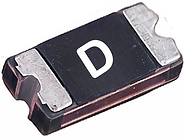
Note: Fuses just like resistor are non‑polar components. Install the SMT 1206, 0.250 ‑ amp fuse using the same procedure as the resistors: tin one pad, tack‑solder the fuse, solder the opposite pad, then reflow the first joint with a small amount of fresh solder.
1. Locate Pad F1
Identify the correct soldering pads for the SMT fuse.
-
Find the pads labeled F1 on the PCB
-
Confirm proper alignment: fuse body aligns in the center of its two pads
2. Tin One Pad
Prepare the pad with solder for tack placement.
-
Apply a small solder bump to one side of the fuse pad
-
Ensure the bump is shiny and not excessive
3. Tack Solder Fuse
Position and secure the fuse using tweezers.
-
Heat the tinned pad to reflow solder
-
Use tweezers to place the fuse across the pads
-
Align the fuse body correctly
-
Remove heat to let solder solidify
4. Solder Opposite Side
Complete the joint by soldering the other terminal.
-
Apply solder to the opposite pad
-
Ensure full wetting of the fuse lead to pad
5. Reflow First Side
Strengthen the initial tack joint.
-
Reheat the first pad briefly
-
Add a small amount of fresh solder
-
Inspect for alignment and shiny finish
Highly Recommended Resistance Validation Testing
Prior to moving on to the top‑side circuit board population, it is recommended that you perform resistance tests to verify that all 15 resistors are properly soldered to their pads.
Using a multimeter, place one lead on the negative side of the D1 solder pad and the other lead on the LED pad closest to the 220‑ohm resistor. Verify that the measurement is approximately 220 Ω (within the expected tolerance). Repeat this procedure for each of the 15 resistors to ensure they are all properly soldered to their pads and making solid electrical contact.
Circuit Board Topside Assembly Instructions
Note: The PCB’s color is determined by the solder mask color that you choose when ordering the PCB from the circuit board fabricator. Solder mask is a protective insulating coating applied over the board to protect the copper circuitry. Before the solder mask is applied, the component pads are masked off so they remain uncovered and exposed for soldering the components’ electrical contacts to the PCB circuitry.
PCB Topside – Bare Board - Shown with Red Color Solder Mask

Assembly Equipment, Supplies, and Components Required
Equipment & Supplies Required
Safety Glasses
Soldering Iron / Soldering Iron Stand / Wet Sponge
Wire Solder - Rosin or No-clean Flux Core
Diagonal Wire Cutters
Components Required
30 Blue or White 5mm LED's
Important Note: LEDs are polarized components, and so in order to function porperly they must be oriented between the two soldering pads with the correct orientation, the cathode marking on the LED must be oriented the negative sign (-) on the PCB.
Illustrations showing how to determine the cathode side of an LED.

LED Side View & Electrical Symbol
For through-hole LEDs, the primary way to determine which lead is the anode, and which is the cathode is the length of the lead.
The anode will always be the longer of the two leads, and the cathode will always be the shorter of the two leads.
A secondary method to identify the anode and cathode leads in through-hole LEDs is that many manufacturers design the LED's plastic housing with a flat edge on the side closest to the cathode lead. (Shown below)
However, this method is less reliable, as not all manufacturers include a flat edge to indicate the cathode side, and the edge may be subtle and difficult to see without magnification.
Example Installation:

PCB Silkscreen
Marketings
Star Topside PCB - LED Installation Procedure Quick View
LED placement:
Insert white LEDs into the positions marked L (Light) and blue LEDs into the positions marked D (Dark). Ensure correct polarity: the long lead (anode) goes into the hole nearest the “–” polarity mark on the PCB.
Securing LEDs:
After insertion, bend the protruding leads on the bottom side outward at a 90° angle to hold the LEDs firmly in place before soldering. Keep the bends close to the board surface for stability.
Trimming leads:
Use diagonal wire cutters to trim the excess lead length. Cut them short enough so they do not extend beyond the solder pads.
Circuit Board Topside General Procedure for:
Installing, Crimping, Trimming, and Soldering Through-Hole LEDs
Materials Needed:
-
Safety glasses
-
Through-hole LEDs (Red, White, Blue)
-
Circuit board (PCB)
-
Soldering iron and solder
-
Wire cutters
1. Identify LED Polarity
-
Anode (+): Longer lead
-
Cathode (–): Shorter lead, often marked with a flat edge on the LED casing
-
Check the PCB for polarity markings "-" near the holes.
2. Orient the LED Correctly
-
Insert the anode the long lead into the hole without a marking.
-
Insert the cathode into the hole marked with a "–" sign.
3. Seat the LED
-
Insert the LED into the designated holes on the PCB until the bottom edge of the lens sits flush with the top surface of the board.
-
While holding the LED firmly in place from the top side, use your fingers to bend each lead outward at a 90-degree angle on the underside of the PCB. Bend the leads in the direction of the rectangular soldering pads, ensuring each lead overlays the pad as close to the center of the pad, and as close to the board surface as possible.
-
This manual bend secures the LED in place, keeping it tightly flush against the circuit board and preventing any movement during soldering.
-
Trim the excess length of each lead so it does not extend beyond the soldering pad, allowing for a clean and reliable solder joint. (Important Safety Note: When trimming LED leads to proper length, secure the section of lead with one of your fingers, or small pliers, as to not allow the lead to fly-off when being cut and hit someone in the face.)
5. Solder the Leads to the Rectangular Pads
-
Heat the pad and lead simultaneously with the soldering iron
-
Apply solder until it flows and covers the pad and lead
-
Remove the iron and let the joint cool.
-
Avoid cold solder joints (dull or cracked appearance)
7. Inspection
-
Visually inspect your solder joints for defects, rework as needed.
-
Refer to the IPC Class‑2 Acceptability Criteria below for proper inspection of all assembly and soldering work. Rework as necessary.
8. Electrical Testing (Recommended Before Full Assembly)
-
After completion of fully populating/assembling and soldering of all LEDs, proceed to electrical testing to validate functionality of all LEDs. Troubleshoot, rework and repair as necessary to obtain a 100% fully functional circuit board.
Circuit Board Bottom Assembly View –
LEDs Installed with Leads Bent and Trimmed Pre-Soldering Leads

General Inspection
IPC Class- 2 Acceptability Criteria for Lead Soldering to Rectangular Pads
1. General Requirements (IPC‑A‑610)
-
Wetting: Solder must wet both the pad and the lead, with smooth flow and no voids.
-
Fillet Shape: Concave fillet preferred, tapering from the pad up the lead.
-
Coverage: Solder should cover the pad fully, with no exposed copper.
-
Cleanliness: No solder balls, bridging.
2. Lead‑to‑Pad Joint Criteria
-
Lead Contact: The lead must lie flat against the pad surface, with no lifting or gaps.
-
Fillet Length:
-
Minimum solder fillet length should extend to at least the end of the lead.
-
For Class 2 assemblies, solder should extend slightly beyond the lead end for mechanical strength.
-
-
Fillet Thickness:
-
Solder thickness should be sufficient to bond but not excessive (no “bulbous” joints).
-
-
Defects:
-
No voids under the lead.
-
No insufficient solder (bare pad areas).
-
No cold joints (dull, grainy appearance).
-
3. Inspection Criteria (IPC‑A‑610, Surface Mount Section)
-
Acceptable Joint:
-
Lead flat on pad, solder fillet visible along sides.
-
Smooth, shiny solder with full pad coverage.
-
-
Defective Joint:
-
Lead lifted or not fully wetted.
-
Solder only partially covering pad.
-
Excess solder obscuring lead outline.
-
Bridging to adjacent pads.
-