Circuit Board Topside Assembly Instructions
PCB Topside – Bare Board - Shown with Blue Color Solder Mask for Clarity.
Black Color Solder Mask Recommended U.S. Flag Soldering Kit.
Note: The PCB’s color is determined by the solder mask color that you choose when ordering the PCB from the circuit board fabricator. Solder mask is a protective insulating coating applied over the board to protect the copper circuitry. Before the solder mask is applied, the component pads are masked off so they remain uncovered and exposed for soldering the components’ electrical contacts to the PCB circuitry.
PCB Topside – Bare Board - Shown with Blue Color Solder Mask

Safety First: Before performing any electronic assembly work, read this website’s Soldering Safety course.
Assembly Equipment, Supplies, and Components Required
Equipment & Supplies Required
Safety Glasses
Soldering Iron / Soldering Iron Stand / Wet Sponge
Wire Solder - Rosin or No-clean Flux Core
Diagonal Wire Cutters
Components Required
12 Blue 5mm LED's
88 Red 5mm LED's
128 White 5mm LED's
Important Please Note:
Red, white, and blue LEDs are polarized components, meaning they must be installed in the correct orientation within a circuit to function properly. If an LED is installed backwards, all LEDs in that LED circuit will fail to light.
Refer to the printed circuit board (PCB) assembly illustration and assembly instructions below for the correct LED locations, and LED installation orientation.
For through-hole LEDs, the primary way to determine which lead is the anode, and which is the cathode is the length of the lead. The anode will always be the longer of the two leads, and the cathode will always be the shorter of the two leads.
A secondary method to identify the anode and cathode leads in through-hole LEDs is that many manufacturers design the LED's plastic housing with a flat edge on the side closest to the cathode lead. (Shown below). However, this method is less reliable, as not all manufacturers include a flat edge to indicate the cathode side, and the edge may be subtle and difficult to see without magnification.
Circuit Board Topside LED Location & Orientation Guide
-
R = Red LEDs
-
B = Blue LEDs
-
W = White LEDs
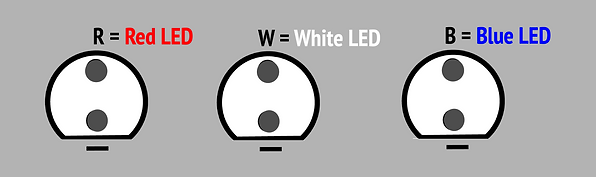


R1 Circuit Example:
Pre-Soldering Assembly Instructions
(See illustration below)
Refer to the above circuit board topside LED location and orientation guide, and insert the LEDs into their designated holes from the topside of the PCB, using the correct color LED, as marked on the PCB, with the correct polarity orientation
Once inserted, bend the protruding leads on the bottom side outward at a 90-degree angle (as shown) to secure (clinching) the LEDs in place before soldering. Bend the leads close to the board as possible
Using diagonal wire cutters, trim the component leads to the length as shown, ensuring they do not extend beyond the pads
R1 CIRCUIT ASSEMBLY ILLUSTRATION, WITH A BLUE COLORED PCB SOLDERMASK:
Illustration shows the PCB bottom-side (solder-side), with LEDs installed, leads formed, and trimmed, prior to soldering the leads to their pads.
Note: R1 is the recommended test circuit. Assemble and electrically test this circuit first to validate soldering technique and correct LED polarity before proceeding with full PCB assembly.

Circuit Board Bottom Assembly View –
LEDs Installed with Leads Bent and Trimmed

General Procedure for:
Installing, Crimping, Trimming, and Soldering Through-Hole LEDs
Materials Needed:
-
Safety glasses
-
Through-hole LEDs (Red, White, Blue)
-
Circuit board (PCB)
-
Soldering iron and solder
-
Wire cutters
1. Identify LED Polarity
-
Anode (+): Longer lead
-
Cathode (–): Shorter lead, often marked with a flat edge on the LED casing
-
Check the PCB for polarity markings "-" near the holes.
2. Orient the LED Correctly
-
Insert the anode the long lead into the hole without a marking.
-
Insert the cathode into the hole marked with a "–" sign.
3. Seat the LED
-
Insert the LED into the designated holes on the PCB until the bottom edge of the lens sits flush with the top surface of the board.
-
While holding the LED firmly in place from the top side, use your fingers to bend each lead outward at a 90-degree angle on the underside of the PCB. Bend the leads in the direction of the rectangular soldering pads, ensuring each lead overlays the pad as close to the center of the pad, and as close to the board surface as possible.
-
This manual bend secures the LED in place, keeping it tightly flush against the circuit board and preventing any movement during soldering.
-
Trim the excess length of each lead so it does not extend beyond the soldering pad, allowing for a clean and reliable solder joint. (Important Safety Note: When trimming LED leads to proper length, secure the section of lead with one of your fingers, or small pliers, as to not allow the lead to fly-off when being cut and hit someone in the face.)
5. Solder the Leads to the Rectangular Pads
-
Heat the pad and lead simultaneously with the soldering iron
-
Apply solder until it flows and covers the pad and lead
-
Remove the iron and let the joint cool.
-
Avoid cold solder joints (dull or cracked appearance)
7. Inspection
-
Visually inspect your solder joints for defects, rework as needed.
-
Refer to the IPC Class‑2 Acceptability Criteria below for proper inspection of all assembly and soldering work. Rework as necessary.
8. Electrical Testing (Recommended Before Full Assembly)
-
Before fully assembling the PCB, first populate and solder the R1 circuit as a test circuit. After completion of assembling and soldering all LEDs in R1, perform electrical testing to validate that all LEDs in that circuit function correctly. Troubleshoot, rework, and repair as necessary until the R1 circuit is 100% functional. Once the R1 test circuit has been validated, proceed with full PCB assembly.
-
After completion of fully populating/assembling and soldering of all LEDs, proceed to electrical testing to validate functionality of all LEDs. Troubleshoot, rework and repair as necessary to obtain a 100% fully functional circuit board.
General Inspection
IPC Class- 2 Acceptability Criteria for Lead Soldering to Rectangular Pads
1. General Requirements (IPC‑A‑610)
-
Wetting: Solder must wet both the pad and the lead, with smooth flow and no voids.
-
Fillet Shape: Concave fillet preferred, tapering from the pad up the lead.
-
Coverage: Solder should cover the pad fully, with no exposed copper.
-
Cleanliness: No solder balls, bridging.
2. Lead‑to‑Pad Joint Criteria
-
Lead Contact: The lead must lie flat against the pad surface, with no lifting or gaps.
-
Fillet Length:
-
Minimum solder fillet length should extend to at least the end of the lead.
-
For Class 2 assemblies, solder should extend slightly beyond the lead end for mechanical strength.
-
-
Fillet Thickness:
-
Solder thickness should be sufficient to bond but not excessive (no “bulbous” joints).
-
-
Defects:
-
No voids under the lead.
-
No insufficient solder (bare pad areas).
-
No cold joints (dull, grainy appearance).
-
3. Inspection Criteria (IPC‑A‑610, Surface Mount Section)
-
Acceptable Joint:
-
Lead flat on pad, solder fillet visible along sides.
-
Smooth, shiny solder with full pad coverage.
-
-
Defective Joint:
-
Lead lifted or not fully wetted.
-
Solder only partially covering pad.
-
Excess solder obscuring lead outline.
-
Bridging to adjacent pads.
-